Multiplayer FPS Character System
A first person character where one pawn drives both the first person arms and the third person body, with projectile based shooting, vaulting, and ledge climbing.
Feature context
- Project context
- Obversus: Umbra
- Status
- In development
- Engine
- Unreal Engine 5.8
Responsibilities
- Designed and implemented the character in C++: the dual view rig, stances, traversal, and the movement component.
- Built the shooting system: projectile ballistics, server authoritative damage, and the per weapon data that drives it.
- Built the networking throughout: predicted movement with saved moves, and predicted fire with server confirmation.
- Built the data driven weapon sway evaluator and its animation graph node.
- Built the health, damage, and death flow: data driven damage, replicated ragdoll, and server respawn.
- Built the wall avoidance system: a per weapon lift of the first and third person rigs, with firing blocked.
- Wired the animation blueprint to the movement component and GAS, including toggling weapon IK for ability driven states like reload.
Overview
A first person character for a multiplayer shooter: one pawn, seen two ways. You see your own arms and weapon; everyone else sees a full body doing the same thing. It handles standing, crouching, prone, sprinting with directional speed rules, vaulting, ledge climbing, and real projectile shooting that drops over distance. Every weapon and movement number lives in a data asset, so new content needs no code.
The system is built on the Gameplay Ability System and splits into 7+ subsystems:
- Realistic Ballistics System: bullet drop and damage falloff over distance
- Procedural Recoil and Camera Shake System: per weapon kick curves plus recovering shake, applied at the controller
- Reload Magazine System: runs through the temporary Loadout system
- Interaction System
- Ledge Climb System: air grabs, vault versus climb decision, predicted traversal
- Kick Ability: server authoritative push with replicated physics and anim notify contact
- Vault System
- Crouch Prone System
- Locomotion and Turn In Place System: speed matched cycles, plus idle body lag with separate stand and crouch turn sets
- Health & Death System: attribute based health, data driven damage, replicated ragdoll, server respawn
- Wall Avoidance System: the weapon lifts and firing stops when the barrel is near geometry
- Footstep System: animation driven plants, surface aware sounds, first person arms in step with the body
- Weapon Sway System: look, move, and idle channels from one data asset
Everything here is tunable and scalable without touching code. The system supports multiple weapon types from one codebase: each weapon is a data asset choosing its own fire rate, accuracy and spread behavior, reload animations, ballistics, and damage falloff over distance. Movement works the same way, every speed and threshold is a number a designer edits.
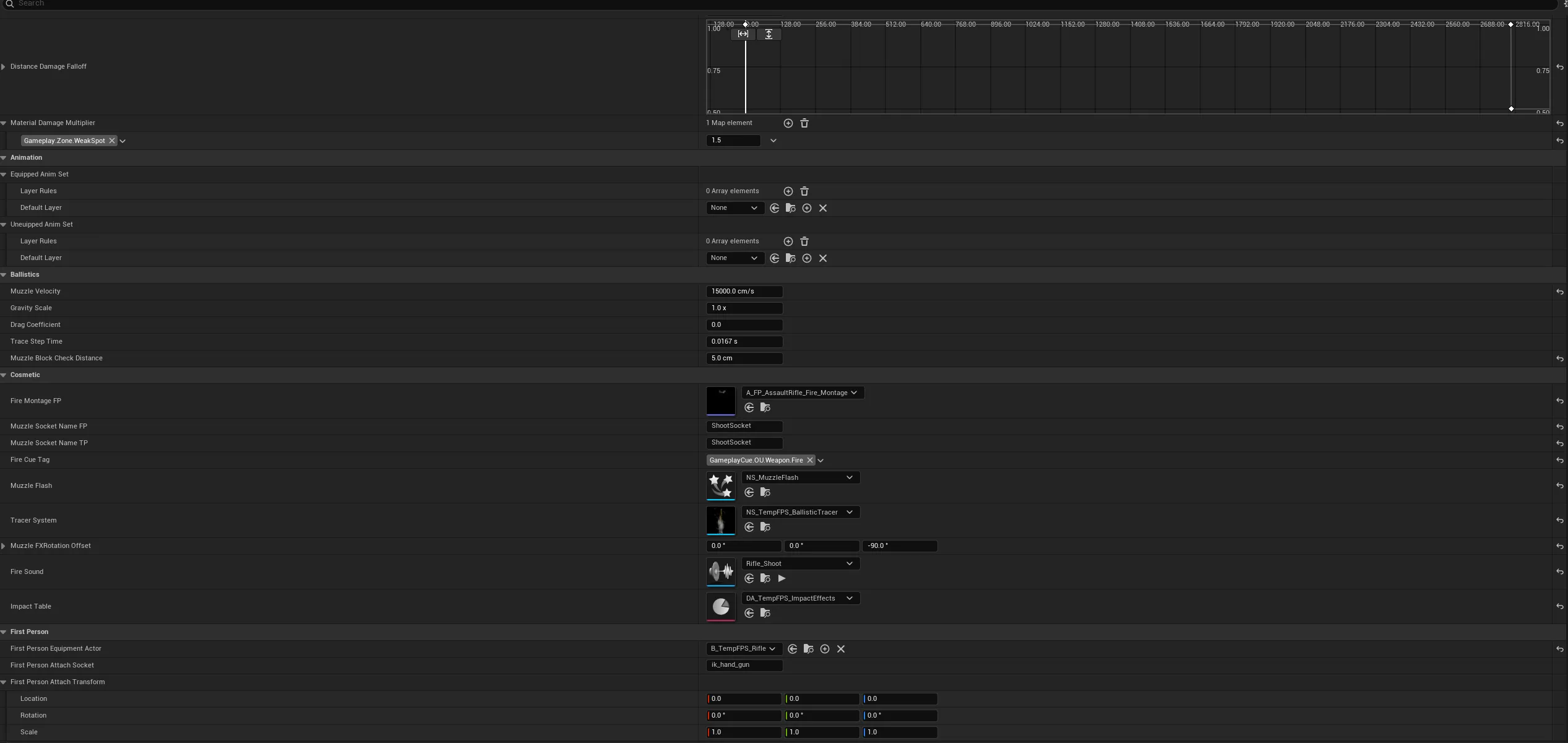
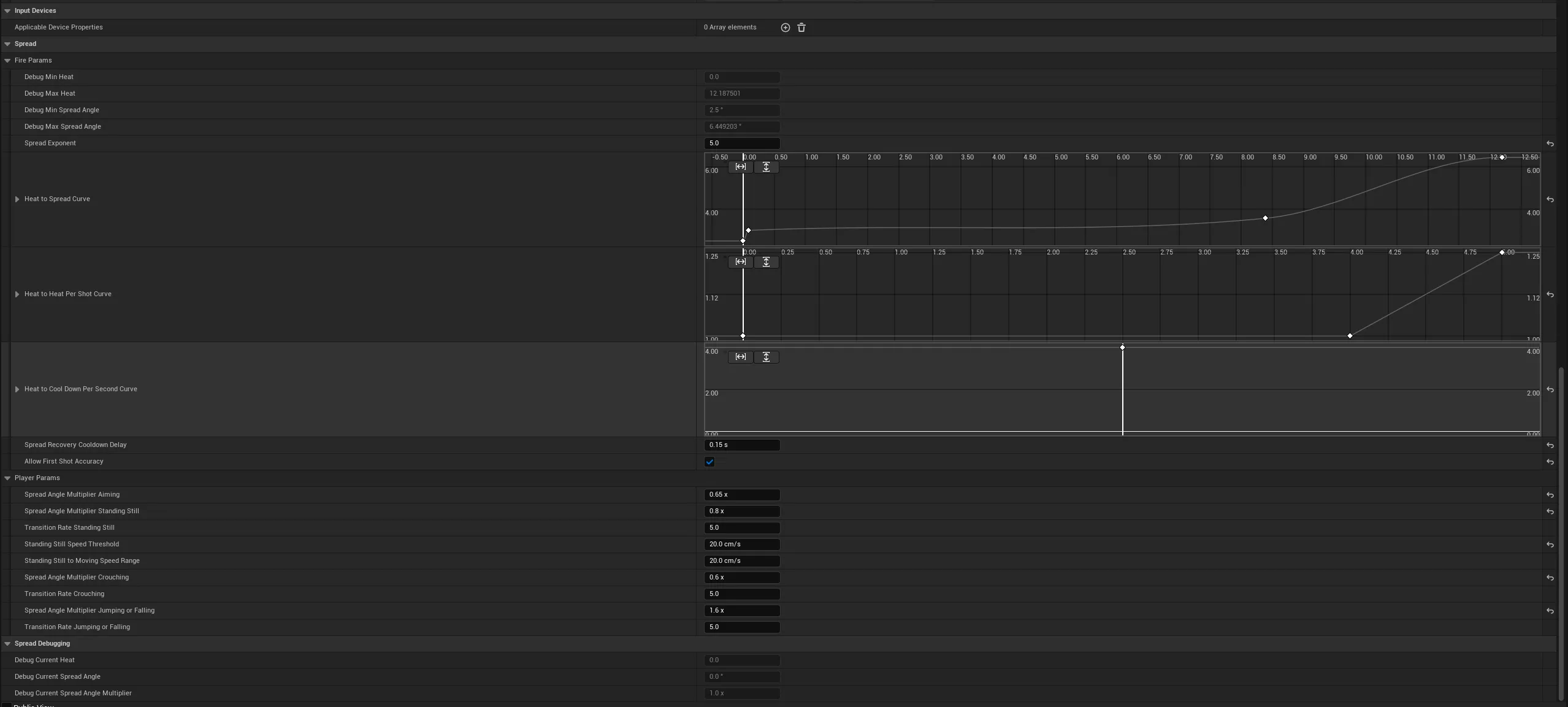
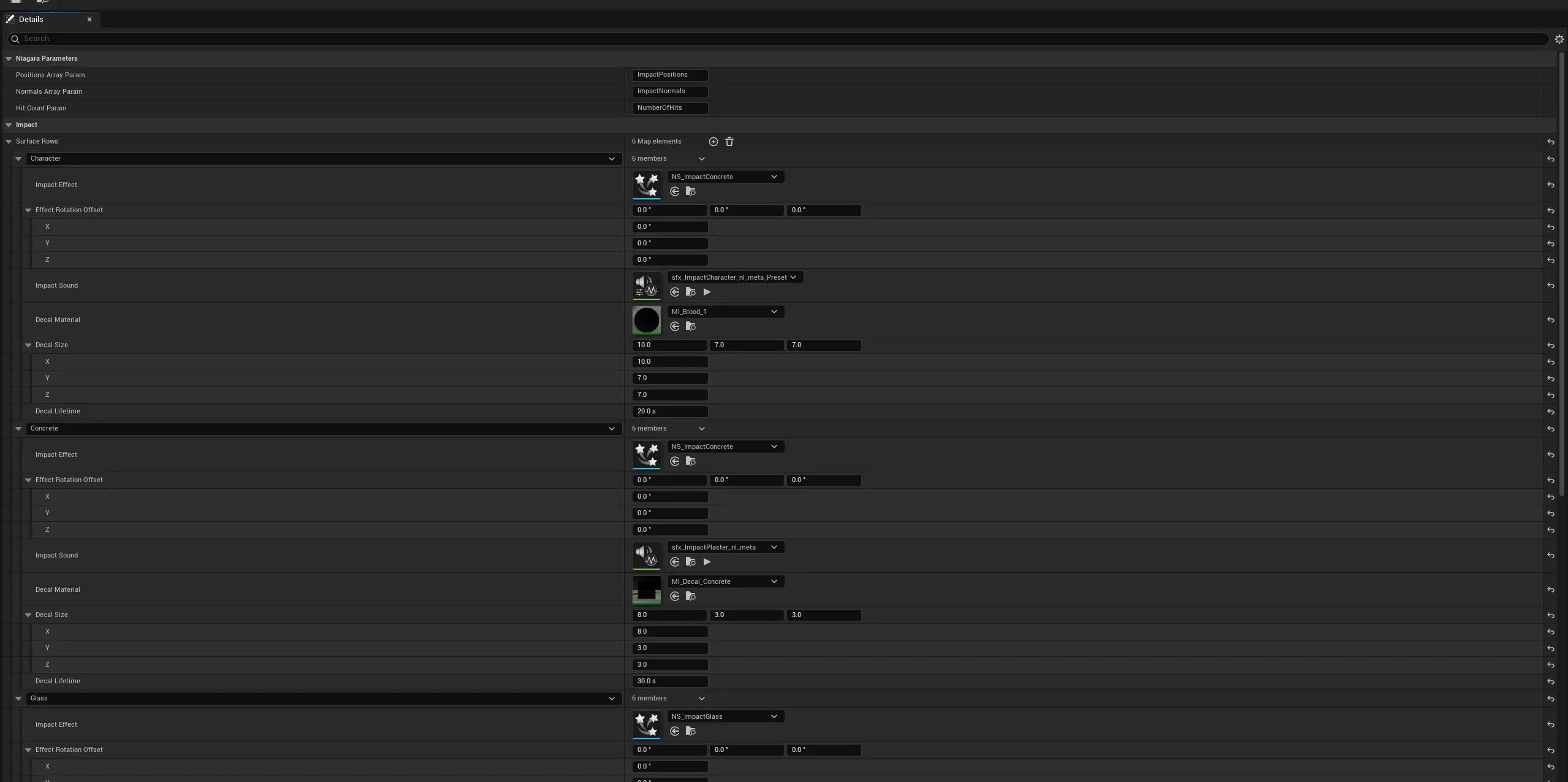
New weapons need no new code. A weapon is one asset: a four number flight model (muzzle speed, gravity multiplier, drag, simulation substep), spread/heat/recoil/ammo/falloff from the Lyra weapon instance underneath, and its cosmetics (fire montage, muzzle sockets, flash, tracer, sound, and a per weapon surface to impact table, since a flamethrower should scorch where a rifle punches a hole). The weapon config follows Lyra’s pattern and architecture, extending its ranged weapon instance instead of replacing it.
Architecture
Input becomes an ability, the ability drives a system on the character, that system reads a data asset, and a hit goes back into the ability system as damage. Each layer only talks to the one below it.
The three middle systems share nothing: movement never asks about weapons, weapons never ask how you’re standing. That’s why prone shipped without touching shooting, and why the projectile model replaced Lyra’s trace without any movement code caring. The data layer underneath is why the same code covers a pistol and a rocket launcher.
The system spans roughly fourteen classes across the character, movement, weapon, loadout, and ability layers.
File Viewer
- Public
- AbilitySystem
- GameplayAbility_Flashlight.h
- GameplayAbility_Gait.h
- GameplayAbility_NightVision.h
- PlayerDamageExecution.h
- PlayerGameplayAbility_Death.h
- Camera
- CameraMode_FirstPerson.h
- Character
- PlayerCharacter.h
- PlayerCharacterMovementComponent.h
- PlayerLocomotionConfig.h
- Cheats
- NoclipComponent.h
- Interaction
- Abilities
- GameplayAbility_Interact.h
- GameplayAbility_ObjectGrab.h
- Components
- GrabbableComponent.h
- PlayerPhysicsToolComponent.h
- Loadout
- PlayerLoadoutComponent.h
- Weapons
- BallisticProjectile.h
- PlayerGameplayAbility_BallisticWeapon.h
- PlayerImpactEffectData.h
- PlayerRangedWeaponInstance.h
- Private
- AbilitySystem
- GameplayAbility_Flashlight.cpp
- GameplayAbility_Gait.cpp
- GameplayAbility_NightVision.cpp
- PlayerDamageExecution.cpp
- PlayerGameplayAbility_Death.cpp
- Camera
- CameraMode_FirstPerson.cpp
- Character
- PlayerCharacter.cpp
- PlayerCharacterMovementComponent.cpp
- Cheats
- NoclipComponent.cpp
- Interaction
- Abilities
- GameplayAbility_Interact.cpp
- GameplayAbility_ObjectGrab.cpp
- Components
- GrabbableComponent.cpp
- PlayerPhysicsToolComponent.cpp
- Loadout
- PlayerLoadoutComponent.cpp
- Weapons
- BallisticProjectile.cpp
- PlayerGameplayAbility_BallisticWeapon.cpp
- PlayerRangedWeaponInstance.cpp
Dual rig setup
The usual fix for first versus third person is two meshes or two pawns that drift apart. Here there is one character: a third person body everyone sees, and first person arms only the owner sees. The owner’s upper body hides via a single bone, so its children collapse and they look down at their own legs. A shadow only copy of the body keeps the shadow correct, a placeholder for a proper shadow pass material switch.
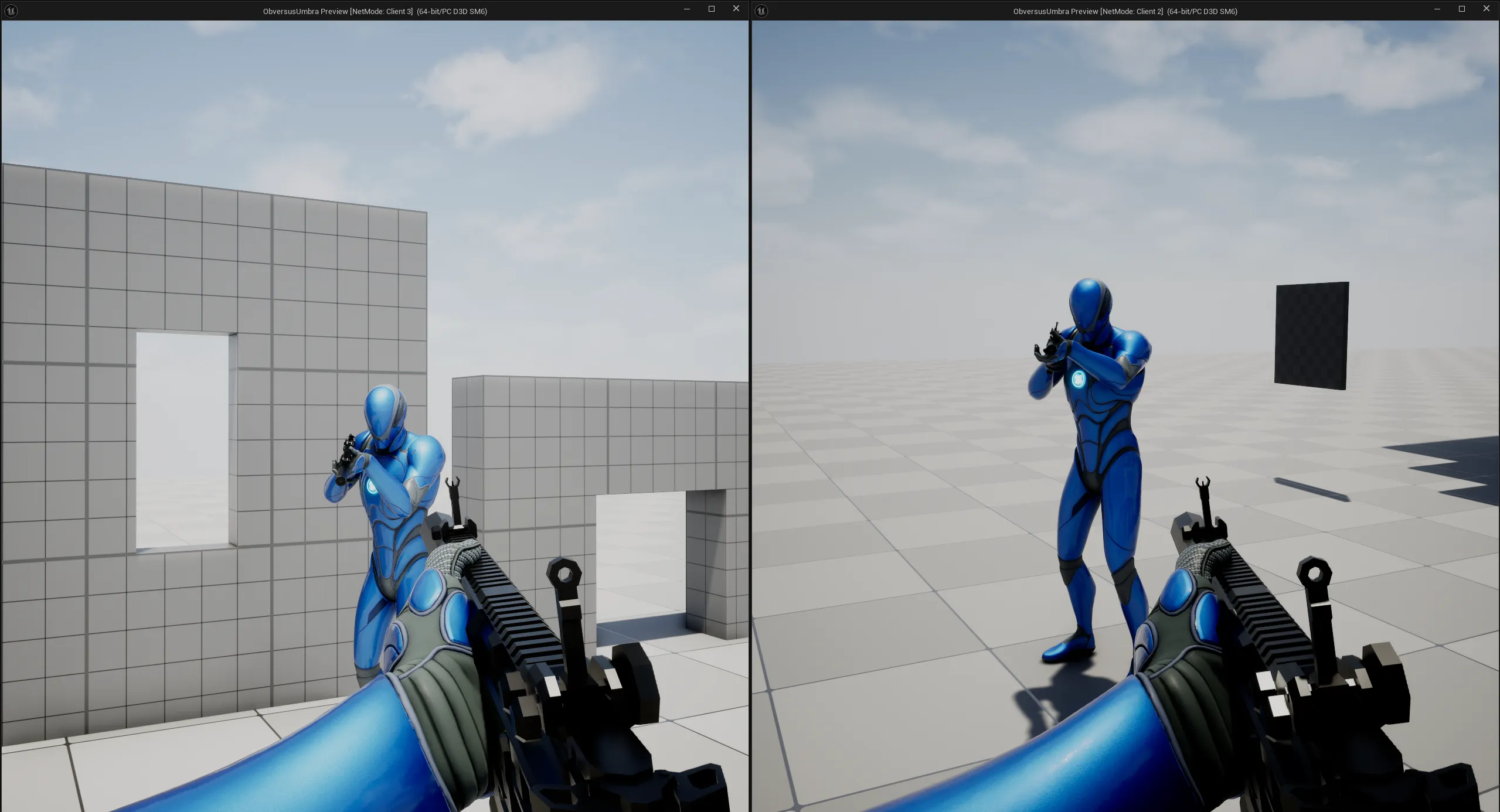
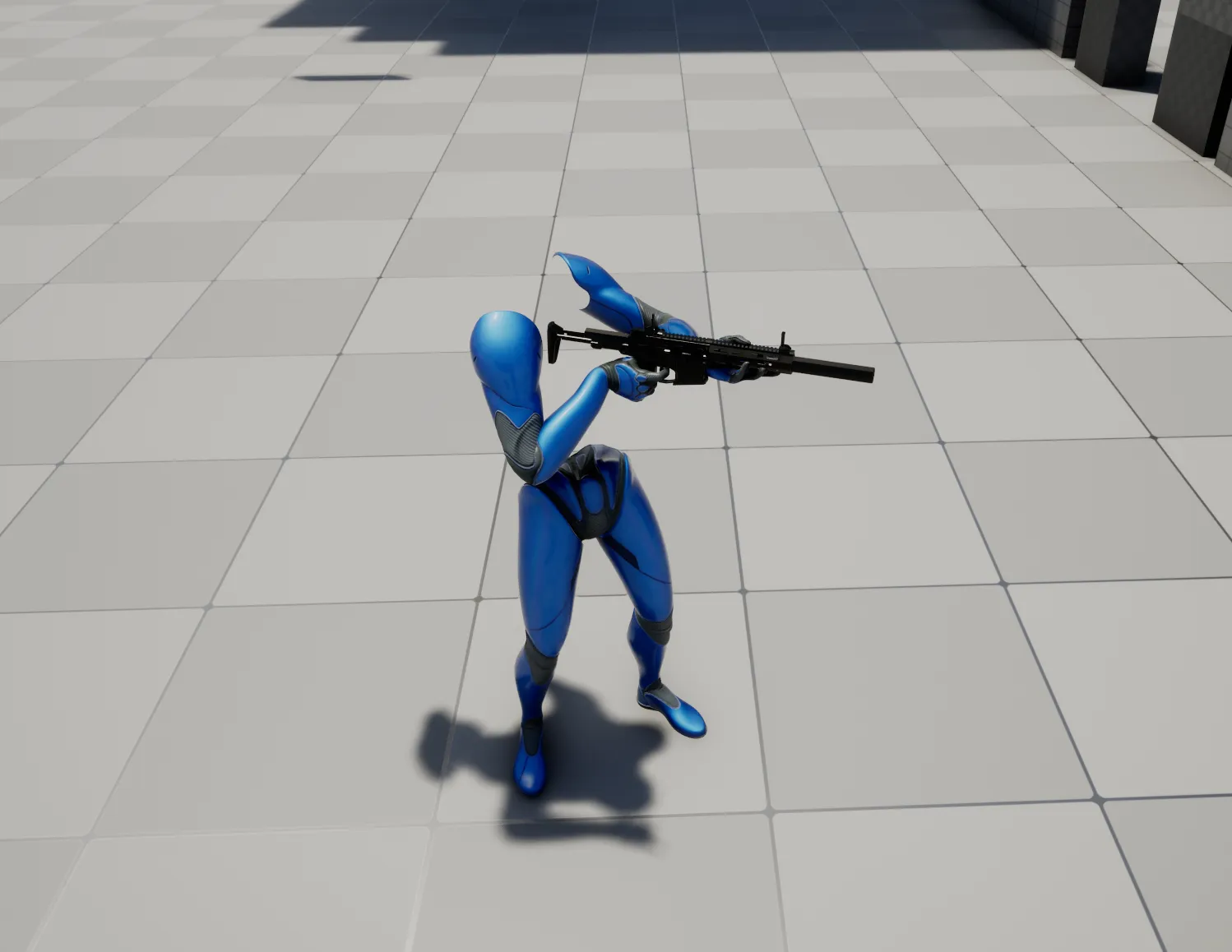
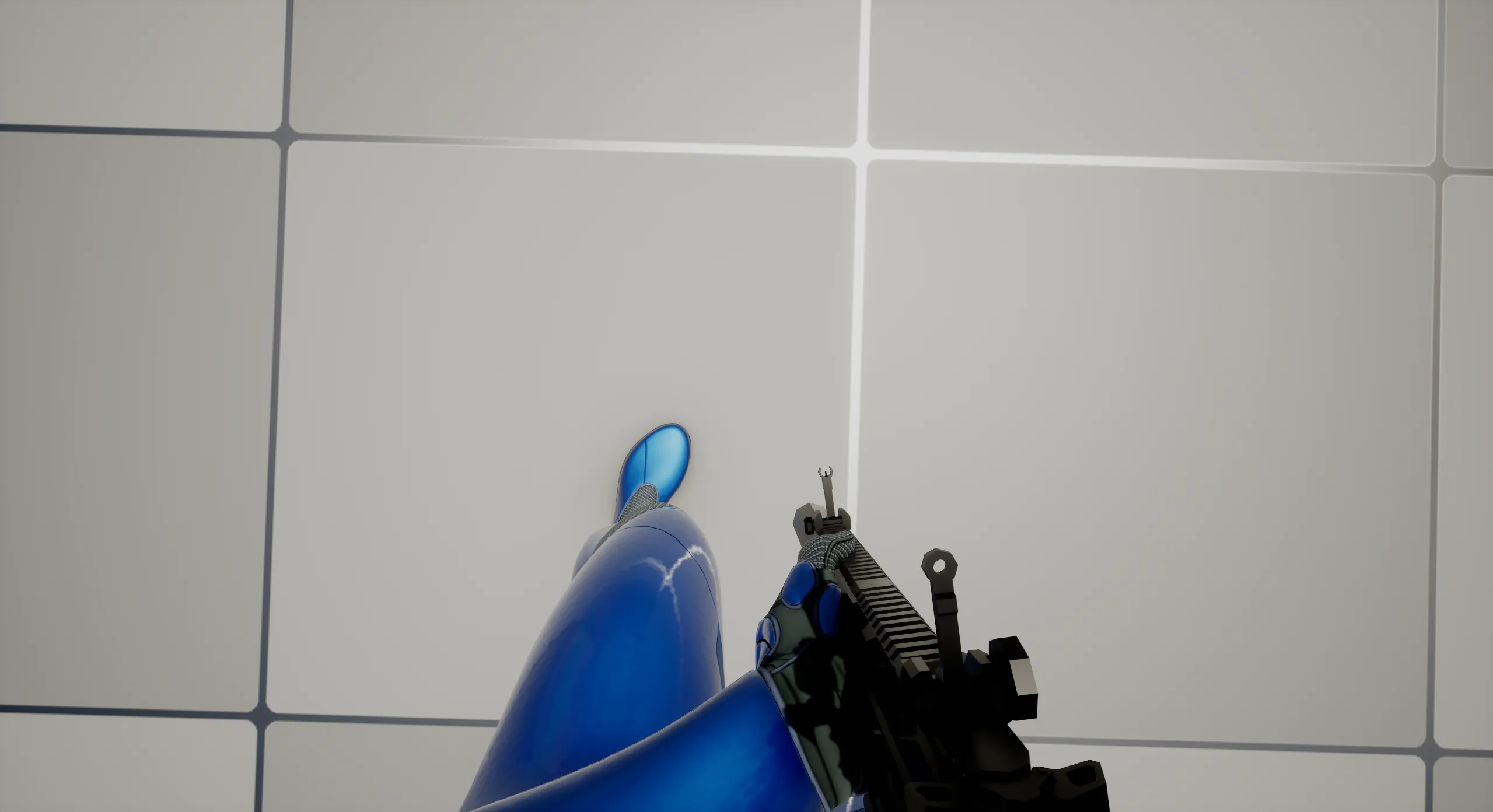
The pivot
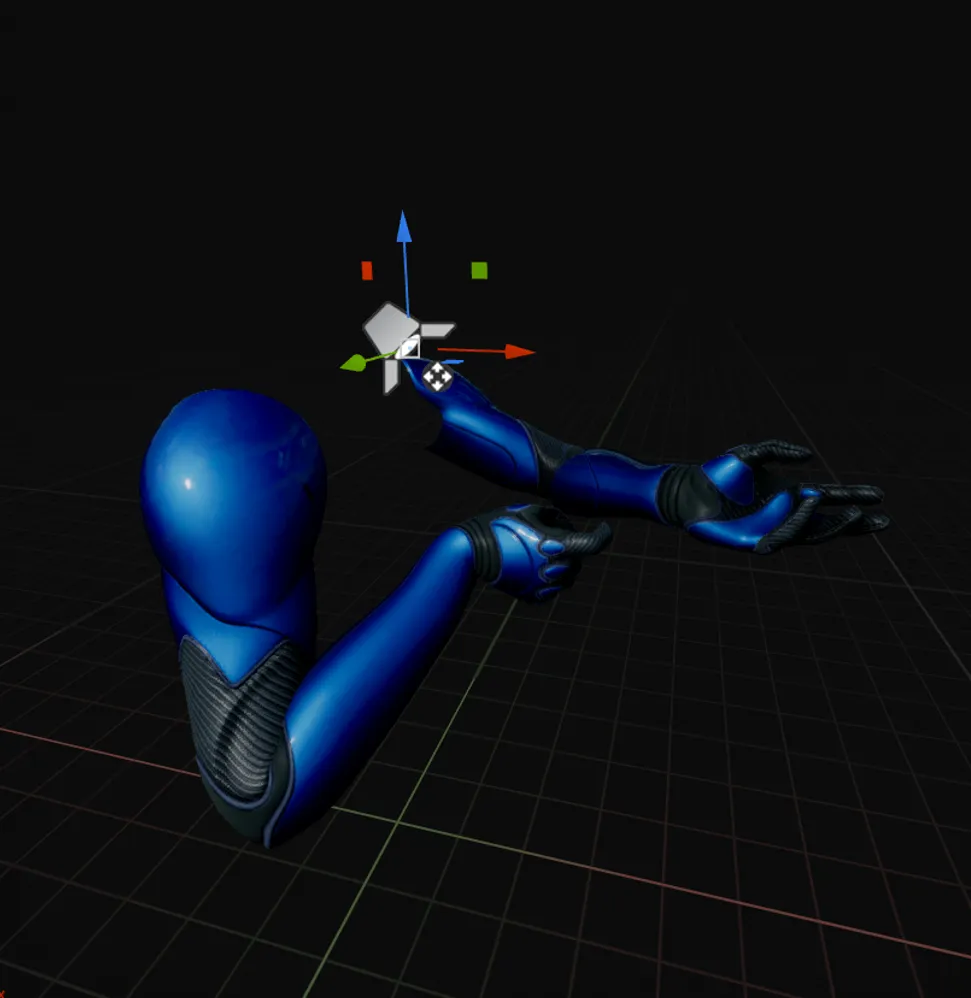
The arms hang off a pivot whose origin sits on the eye socket, so rotating it turns the arms around the eye, like a head: camera locked with no blend and no lag. A held flashlight hangs off the same pivot and gets that for free.
It only exists because of the dual rig. It drives the FP rig, and the FP rig drives the head bob, so this setup decides how the whole game feels. A single rig hands that to the body, where root motion and turn in place animations drag the camera with them; splitting the rigs cuts that link. How tightly it is tuned is much of what separates Tarkov from Counter-Strike, STALKER, or this game.
The pivot is a child of the character’s default mesh, the one ACharacter already smooths over the network, so the arms inherit that smoothing and turn in place stays open later. That is also why it is positioned through the unsmoothed mesh attachment offsets: the live transform cancels the engine’s smoothing, and the camera shakes on every remote correction.
// Convert through unsmoothed mesh attachment offsets so the eye keeps CMC smoothing.
// Using the live mesh transform would cancel that smoothing.
const FQuat MeshBaseRotation = GetBaseRotationOffset();
FirstPersonPivot->SetRelativeLocation(MeshBaseRotation.UnrotateVector(ActorSpaceEye - GetBaseTranslationOffset()));
FirstPersonPivot->SetRelativeRotation(MeshBaseRotation.Inverse() * ActorSpacePitch);
Two aiming techniques that have to agree
The camera has to rotate together with the arms, or the weapon stops feeling like something you are holding. That forces the first person (FP) and third person (TP) models onto two different aim offset techniques: the FP arms rotate around the eye pivot so they never lag the camera, while the TP body bends through its spine so observers see a person actually aiming.
The FP half of that is code. The arms are shifted so their eye socket lands exactly on the pivot origin, measured from the mesh reference pose rather than the live pose, which is what makes rotating the pivot rotate the arms around the eye:
void APlayerCharacter::AlignArmsToPivot()
{
	const FTransform SocketRest = SkeletonUtils::ComputeRefPoseSocketTransform(FirstPersonArms->GetSkinnedAsset(), EyeSocketName);
	// ...
	// Relative location cancels the rotated socket rest position, socket lands on the pivot origin.
	const FVector SocketInPivotSpace = FirstPersonArms->GetRelativeRotation().RotateVector(SocketRest.GetLocation());
	FirstPersonArms->SetRelativeLocation(-SocketInPivotSpace);
}
SkeletonUtils is a small helper of mine that finds where a socket sits on the mesh’s reference pose, here the eye socket, so the arms can be slid until it lands exactly on the pivot origin. Measuring the live head against that rest answer is also what tells the camera how much head bob to apply.
The TP half is not code. The spine bend is an aim offset asset, so lining it up against this pivot was tuning in the editor rather than something I could solve with a formula.
None of this affects damage, since aim is taken from the camera rather than from either mesh. What a gap does break is what everyone else sees. Other players read your intent off the TP body, so if the spine bend disagrees with the camera, the body points somewhere the player is not looking, and a hit lands from a barrel that visibly was not aimed at them.
First Person Rendering
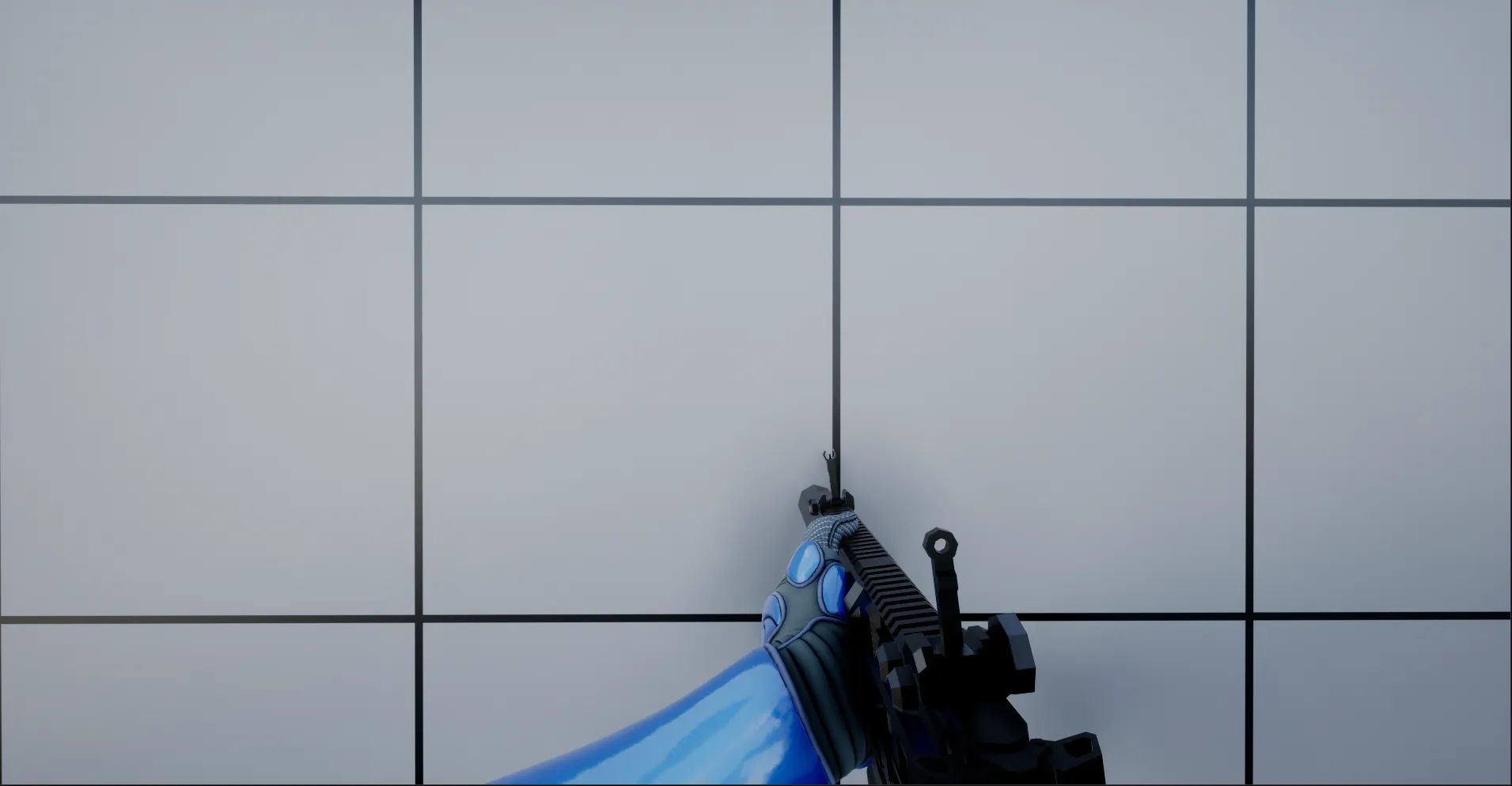
The arms render in Unreal’s first person pass so they don’t poke through a wall you’re standing against. That’s a rendering fix, not a physical one: the arms do not clip, but they still occupy the space the wall is in. Every detail here, from the pivot to the eye easing between stances, exists for one reason: a camera that moves like a head is what makes the player feel present in the level.
Wall Avoidance
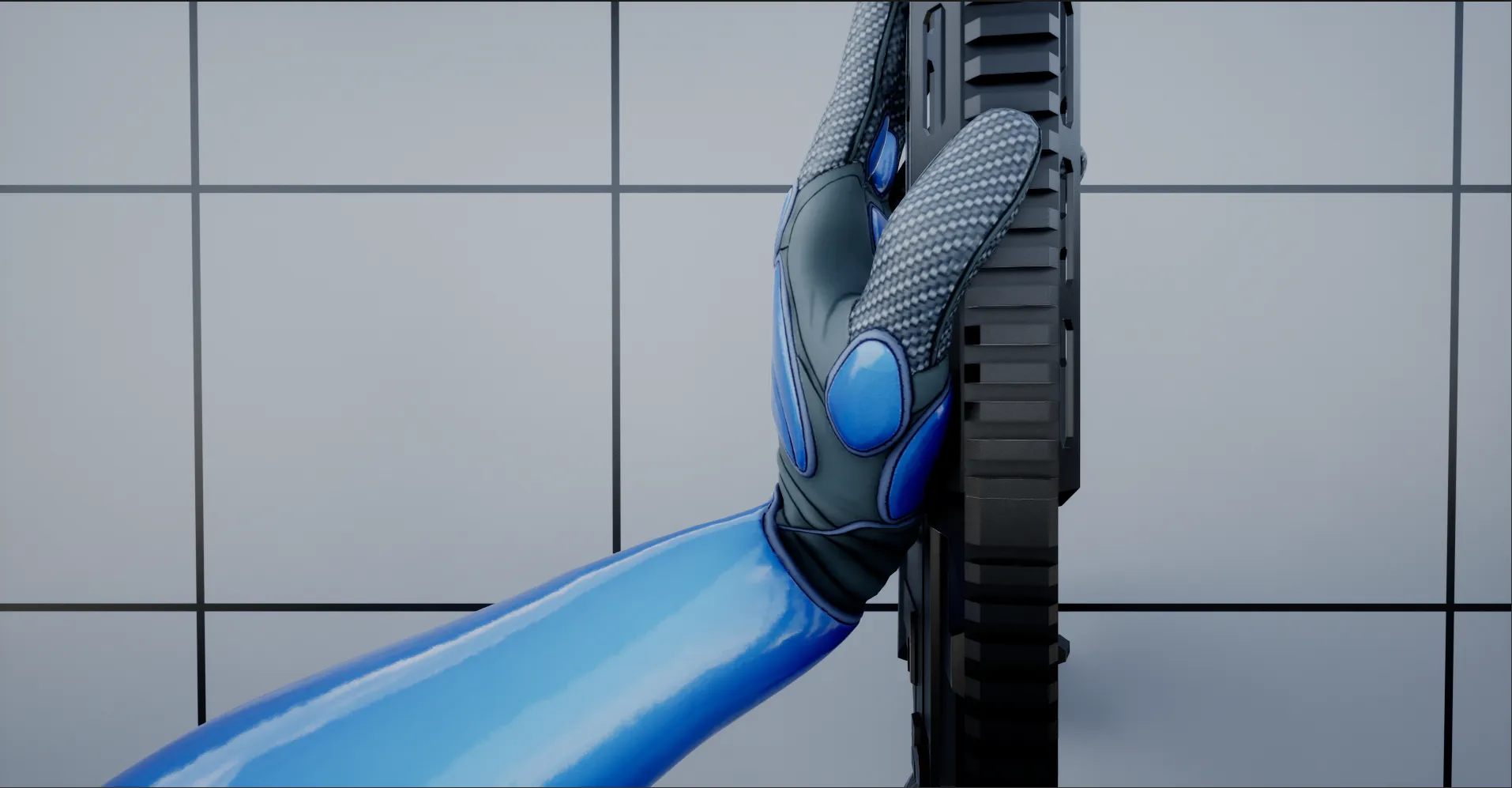
Rendering hides the clipping. Wall avoidance answers it physically. A component on the character sweeps a sphere from the eyes along the replicated aim, on a timer, on every machine. Nothing replicates: each machine reads the same aim and reaches the same answer, so other players see the weapon lift too. The equipped weapon hands the component its config on equip. A weapon with no config, like a melee weapon, never lifts.
const FVector Start = Pawn->GetPawnViewLocation();
const FVector End = Start + Pawn->GetBaseAimRotation().Vector() * Config->TraceDistance;
bIsWallBlocked = World->SweepTestByChannel(
	Start, End, FQuat::Identity, ECC_Visibility, FCollisionShape::MakeSphere(Config->TraceRadius), QueryParams);
A blocked sweep does three things:
- First person arms: a lift weight eases toward full while blocked and back to rest otherwise, with separate raise and lower speeds. The weight offsets the weapon bone in the animation graph, and the right hand follows through IK.
- Third person body: the aim offset pitch blends toward a look up pose, so observers see the weapon raised instead of pushed into the wall.
- Firing: the local player gets a no firing tag, so the trigger does nothing while the barrel is against geometry.
// Eases toward full lift while blocked, toward rest otherwise.
float GetNextAlpha(float Alpha, bool bIsBlocked, float DeltaSeconds) const
{
	return FMath::FInterpTo(Alpha, bIsBlocked ? 1.0f : 0.0f, DeltaSeconds, bIsBlocked ? LiftSpeed : LowerSpeed);
}
Every number is a per weapon data asset: sweep length and radius, raise and lower speed, the first person pose offset, and the third person aim pitch at full lift. A long rifle gets a longer sweep than a pistol. This is the second line of defence next to muzzle blocking, which refuses the shot on the server.
Ballistic System
Lyra ships an instant trace weapon; this needed real bullets instead. Each shot launches a projectile with a muzzle speed, gravity, and optional drag, so it takes time to arrive and drops over distance, and leading a target is a real skill rather than a hidden calculation.
The client plays recoil, muzzle flash, sound, and tracer instantly, but damage only applies when the server’s own bullet reaches a blocking target. The client reports where it aimed, never the outcome. The server also validates the shot origin against its own view of the shooter, blocks firing through a wall the barrel is pressed into, and rate limits fire with a small timing tolerance so a bad connection costs no shots and can’t be abused.
Muzzle blocking
The bullet leaves the barrel, but you aim with the camera, and those are not in the same place. Stand with your back against a wall and the camera sits behind it while the muzzle pokes through to the other side, so a naive shot would fire from outside the cover you are hiding behind.
The fix is a trace from the eye to just past the muzzle. If anything solid sits in that gap, the barrel is inside geometry and the shot is refused:
const FVector AimDirection = (ShotOrigin - ViewLocation).GetSafeNormal();
const FVector TraceEnd = ShotOrigin + AimDirection * WeaponData->GetMuzzleBlockCheckDistance();

FCollisionQueryParams QueryParams(SCENE_QUERY_STAT(MuzzleBlock), /*bTraceComplex=*/ false, AvatarPawn);
QueryParams.AddIgnoredActors(WeaponData->GetSpawnedActors());

FHitResult BlockHit;
const bool bBlocked = World->LineTraceSingleByChannel(BlockHit, ViewLocation, TraceEnd, ECC_Visibility, QueryParams);
// ...
return !bBlocked;
The weapon’s own actors are ignored, or the gun would block itself. The trace runs a short distance past the muzzle, so a barrel flush against a surface still counts as blocked, and that distance is per weapon since a rifle sticks out further than a pistol. The shooter checks it before firing, spending no ammo; the server checks it again on arrival, so a client cannot claim a shot origin out in the open while its body is behind cover.
How a shot happens
Pulling the trigger runs the targeting on the shooter’s own client first: a trace from the camera through the crosshair, offset by a spread cone biased toward the centre, once per bullet in the cartridge. That trace never applies damage, it only decides where the aim ended up, and the result is packaged as ability target data.
On the shooter’s machine the recoil montage and muzzle flash play with zero wait. The same data goes to the server, which reruns every check before trusting it: aim count matches the weapon, every bullet shares one shot origin, the origin is close enough to that player’s own view to not be spoofed, and the fire rate limit has room. Only then does the server commit ammo and spawn the real projectile. Fail any check and the shot is dropped silently, indistinguishable from a miss.
Tracers are a gameplay cue, not a bullet. Everyone who receives it spawns a cosmetic-only projectile along the same path, the same class as the real bullet but flagged non-authoritative, so it can never apply damage no matter what it hits.
Procedural recoil and camera shake
Each shot feeds a recoil component owned by the character. Kick accumulates per shot and never auto recovers, the player pulls down. Shake accumulates then bleeds back to zero on tick. Both apply through controller pitch and yaw input, so camera, crosshair, muzzle aim, and the replicated third person pose turn together. An engine camera shake class runs on top as a local only cosmetic layer.
Every number is a per weapon data asset: pitch and yaw curves sampled by shot index with loop or clamp, base values, per shot randomness, shake amplitudes, shake recovery speed, and the shake class. One scale float folds stance, movement, and ADS into the call:
void URecoilComponent::ApplyKick(APawn* Pawn, const URecoilConfig* Config, float Scale)
{
	if (!Config->bApplyKick)
	{
		return;
	}
	float Pitch = SampleShotCurve(Config->PitchCurve, ShotIndex, Config->bLoopPattern, Config->PitchBase);
	float Yaw = SampleShotCurve(Config->YawCurve, ShotIndex, Config->bLoopPattern, Config->YawBase);
	Pitch += FMath::FRandRange(-Config->PitchRandom, Config->PitchRandom);
	Yaw += FMath::FRandRange(-Config->YawRandom, Config->YawRandom);
	Pawn->AddControllerPitchInput(Pitch * Scale);
	Pawn->AddControllerYawInput(Yaw * Scale);
}
The recoil lives in its own runtime module with no FPS includes, so any project can reuse it. The FPS character just owns the component, the ballistic fire ability calls it, and the weapon instance resets the shot index on swap.
Health & Death System
Health is a pair of attributes on the ability system, health and max health, so anything that can be hurt or healed goes through the same path. The inventory screen reads them through a view model beside the survival stats.
Damage is one calculation for every source. A weapon supplies its base damage, the weapon’s distance curve scales it by how far the bullet travelled, and the physical material of the hit body part scales it again, so a head and a leg can differ by data alone. A kick passes its own damage through the effect instead of reading the weapon. There is no team check: any player can damage any other player. Bullets also damage actors with no ability system, because the projectile runs the same effect on them.
When health reaches zero, a death ability takes over. It cancels every other ability and stops movement and capsule collision on every machine. The owner’s camera detaches to a death camera mode and watches the body. The body goes through these steps:
- Body swap: the owner’s first person arms hide, the full third person body shows, and the body becomes a simulated ragdoll.
- Killing shot: the server reads the killing hit from the death event, scales its direction into an impulse, and replicates it. Every machine pushes the ragdoll at the same bone in the same direction.
- Cleanup: a held physics object is dropped. The owner’s shadow proxy stops casting, so the ragdoll shadow is not stale.
- Gear: the local player’s inventory save is discarded, so gear dies with the body and the respawn starts from the starting items.
The ragdoll and the replicated hit arrive in either order, and the impulse applies once, when both exist:
void APlayerCharacter::TryApplyKillingImpulse()
{
	USkeletalMeshComponent* Body = GetMesh();
	if (!Body || !bDeathRagdollActive || !KillingHit.bValid || bKillingImpulseApplied)
	{
		return;
	}

	bKillingImpulseApplied = true;
	Body->AddImpulseAtLocation(KillingHit.Impulse, KillingHit.Location, KillingHit.Bone);
}
Respawn is server driven. A timer starts with the death, and when it fires the server ends the ability first, detaches the dead pawn from its controller, and asks the game mode to restart the player on the next frame. Detaching first matters: a restart that ran before the detach would see a live pawn and drop silently. A death ended early clears the timer, so a stale respawn never fires. The respawn delay, the death camera, and the ragdoll impulse strength are values on the ability.
Locomotion System
Movement is one data asset too, holding every speed, stance, and traversal threshold.
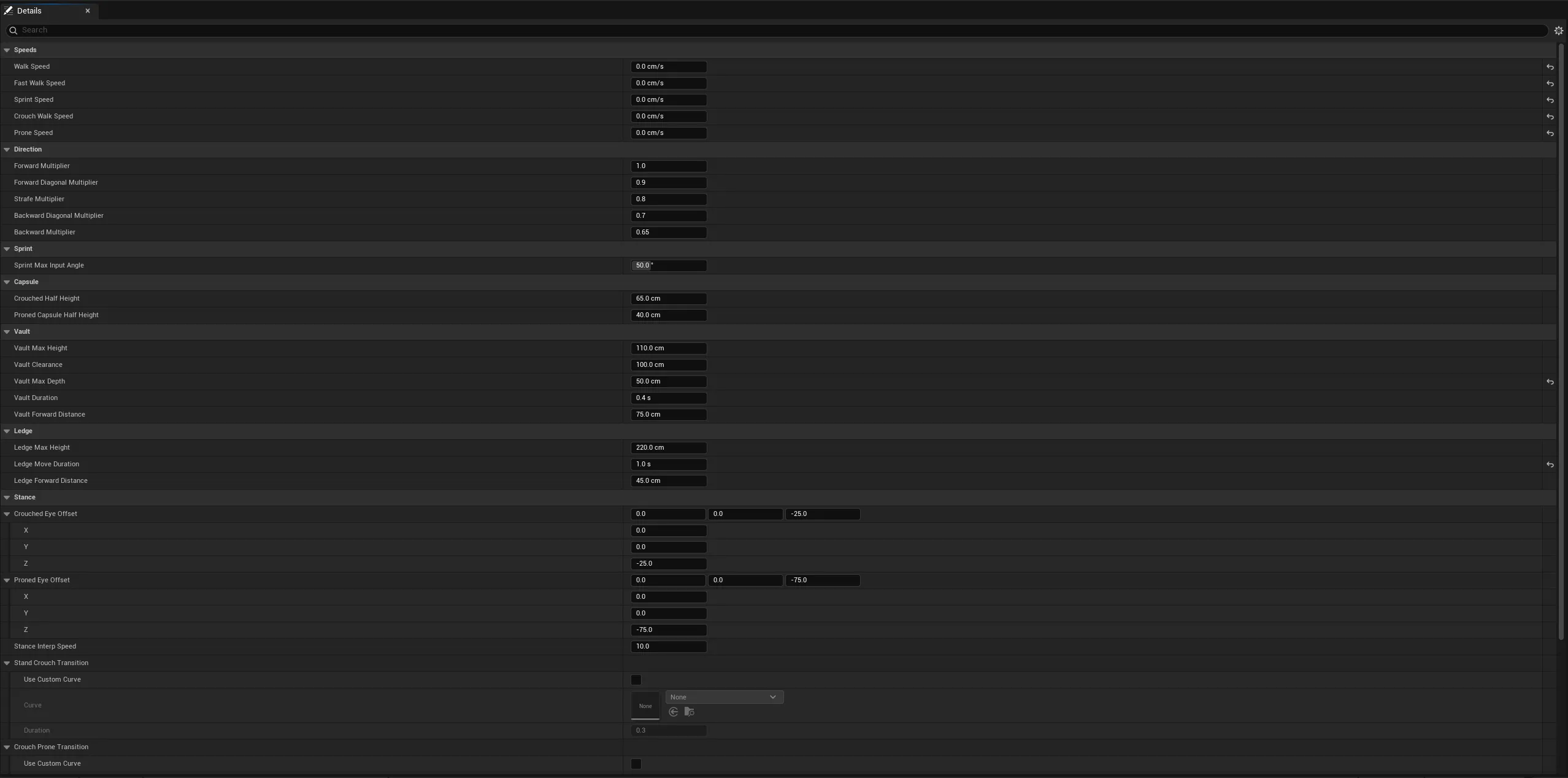
Backpedalling is slower than strafing, slower than a diagonal, slower than running forward: five numbers a designer tunes, not a rule buried in code. Stances are standing, crouched, and prone; changing one resizes the capsule and eases the eye to its new height without popping, and prone also clamps camera pitch and hides the body for the owner.
Vaulting and ledge climbing are custom movement modes, not animations played on top of normal movement. One trace finds the wall, classifies the obstacle, and checks the space above to pick between going over it, climbing onto it, or doing nothing. Both then move the character along a computed path over a set duration.
Traversal under network prediction
It all runs inside Unreal’s movement prediction. Gait intent, the traversal trigger, and the whole traversal path live on a custom saved move, so when the server corrects the client, the replay continues the same vault instead of restarting or dropping it. Client, server, and replay all read identical geometry and reach identical decisions.
Ledge grabbing
Ledges can be grabbed mid air as well as from the ground, and the climb needs a jump press, so walking into a wall never climbs it. One probe sweep finds the wall, classifies the face, finds the lip, and checks facing. Height then picks the move: low obstacles vault over, higher ones climb onto, and anything in the air is always a climb:
// In the air every ledge is climbed onto, nothing is vaulted over.
const float ObstacleHeight = Probe.GetObstacleHeight();
if (!Probe.bInAir && ObstacleHeight <= LocomotionConfig->VaultMaxHeight)
{
    return TryStartVault(Probe);
}
if (ObstacleHeight <= LocomotionConfig->LedgeClimbMaxHeight)
{
    return TryStartLedgeClimb(Probe);
}
Vault needs a free capsule above the lip plus a far edge within depth; ledge climb places a standing capsule on the surface and snaps to the floor. Both are custom movement modes with zeroed velocity and path lerp, and both ride the same predicted saved move as gait, so a server correction replays the same traversal instead of restarting it.
Locomotion and turn in place
Locomotion plays cardinal cycles that match the movement speed, with jump and stop animations on top. Idle turn in place covers standing and crouching, with left and right turn steps per stance, each sized to cover a turn. The body anim instance accumulates root yaw lag only when grounded, unaccelerated, and not prone, clamps it to a data driven limit, and arms a turn once the lag passes a threshold. The locomotion linked layer picks the smallest covering turn, skips the overshoot by binary searching the start time, and plays it in place with no root motion translation and no capsule rotation. Each turn asset carries yaw weight curves, so the played yaw feeds back into the lag and chained turns blend inertially:
RootYawOffset = FRotator::NormalizeAxis(RootYawOffset - ActorYawDelta - TurnYawDelta);
RootYawOffset = FMath::Clamp(RootYawOffset, -MaxRootYawOffset, MaxRootYawOffset);
bShouldTurnInPlace = FMath::Abs(RootYawOffset) > TurnInPlaceThreshold;
Because playback never reads the evaluated pose, it works for unrendered and server meshes too. Upper body aim counter rotates against the lag so the weapon stays forward while the legs step around.
Kick
Kick is a locally predicted GAS ability, blocked while falling, crouching, proning, vaulting, climbing, grabbing, or reloading. It captures the eye viewpoint before the montage moves the head, forces the mesh to tick pose off screen so the server still gets notifies, then sweeps a sphere along the view with the pitch limited, so the kick cannot target straight up or down.
Contact is server authoritative, cosmetics are predicted. Doors take an impulse at the hit location through their kinematic hinge, root physics bodies are set to replicate and pushed with a per target multiplier, and lattice cages deform at the contact point. Damage goes through GAS as a kick effect, or point damage for non GAS actors. The anim notify is a branching point that sends the contact event only from the character mesh, so Persona previews and the first person arm copy never trigger it.
bool FSavedMove_Player::CanCombineWith(const FSavedMovePtr& NewMove, ACharacter* InCharacter, float MaxDelta) const
{
	// A gait or jump trigger input edge must keep its own move so the server sees the exact frame.
	const FSavedMove_Player* NewPlayerMove = static_cast<const FSavedMove_Player*>(NewMove.Get());
	if (bSavedWantsToSprint != NewPlayerMove->bSavedWantsToSprint || bSavedWantsToFastWalk != NewPlayerMove->bSavedWantsToFastWalk)
	{
		return false;
	}
	// ...
	return Super::CanCombineWith(NewMove, InCharacter, MaxDelta);
}
Animation Setup
Weapons drive their own animation through Unreal’s linked animation layers. Each weapon instance holds one rule set for equipped and one for unequipped, picks the best matching anim layer class from the cosmetic tags, and links that layer into the body. Production animations are still missing, so the layers carry placeholder poses. The fire montage, locomotion from the movement component, and the aim offset bending the spine run on the base body underneath.
Hand IK works alongside the layers. GAS tells the animation blueprint when a reload is running, and the blueprint toggles that IK off so the animation plays without a fight. On the third person body the left hand follows the weapon’s IK socket, solved in bone space, so the hand never trails the gun.
Footsteps
Footsteps come from animation notifies on the third person body, not from a timer, so every cycle, stop, and landing sounds when the foot actually plants. Each notify is a context effect, and the surface under the foot picks the sound. A short minimum interval counts blended plants once.
The first person arms keep step with the body. They count the body’s foot plants and play their own steps on the same beat, so the owner hears the same rhythm that other players hear. The owner’s shadow proxy runs its graph only for the pose, so its notifies are dropped and no step plays twice.
Weapon sway
A first person weapon that ignores the camera and the body looks fixed to the screen. Sway adds that motion back as a small offset on a bone, built from three channels that trigger independently. The look channel lags behind how fast the view turns. The move channel leans with local velocity. The idle channel drifts slowly while standing and fades out once the character moves.
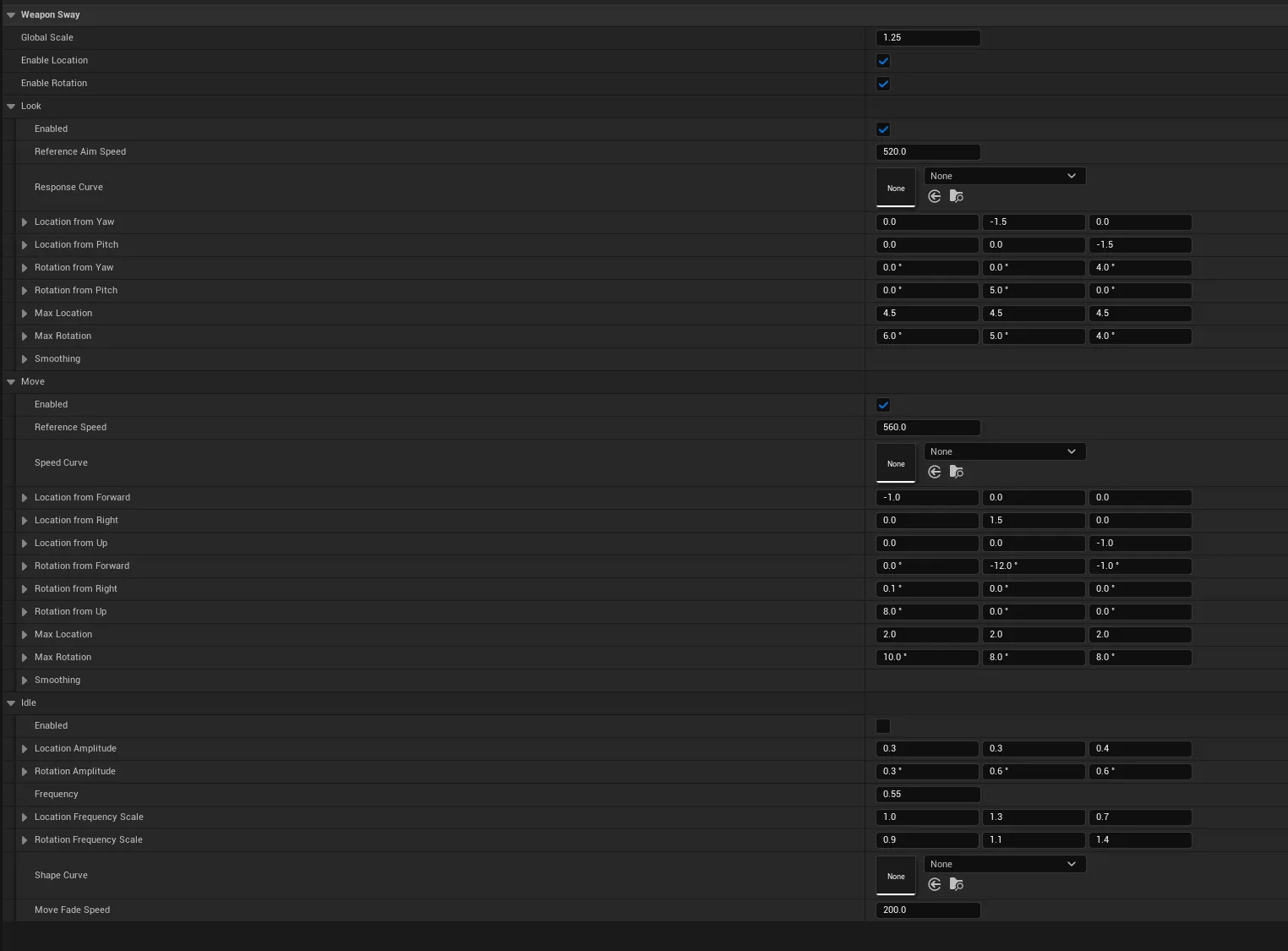
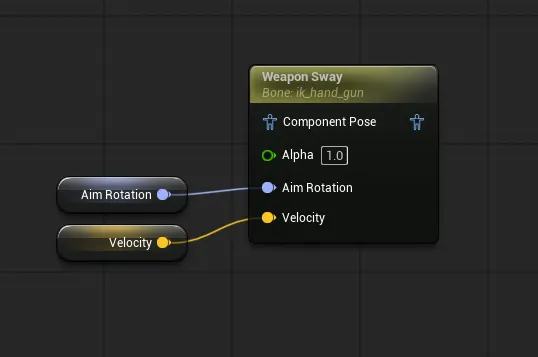
The evaluator is a pure function. It takes an aim rotation, a velocity, and a delta time, and returns an offset. It knows nothing about pawns or weapons, so the same code drives a weapon bone, a camera, or a held tool:
void TickLocomotionSway(
	const FSwaySettings& Settings,
	FSwayState& State,
	const FSwayInput& Input,
	FVector& OutLocation,
	FRotator& OutRotation)
{
	FVector Offset = FVector::ZeroVector;
	Offset += EvaluateLookChannel(Settings.Look, State.Look, Input);
	Offset += EvaluateMoveChannel(Settings.Move, State.Move, Input);
	Offset += EvaluateIdleChannel(Settings.Idle, State.Idle, Input.DeltaTime);
	// ...
	OutLocation = Offset * Settings.GlobalScale;
}
An animation graph node calls it on the animation thread and writes straight to the chosen bone. A thread safe Blueprint library exposes the same evaluator to any actor outside the graph.
Each channel picks its own smoothing from a dropdown. A spring overshoots and settles, which suits weapon weight. A plain ease reaches the target with no overshoot, which reads as mechanical. Each channel also has its own reference speed, optional response curve, per axis location and rotation, and a clamp so one bad frame cannot throw the weapon off screen. One global scale lets aiming down sights dial the whole effect down with one number.
Interaction
One key does everything. The target decides what the press means. Each object implements one interface that lists what the player can do with it, so adding an interactable is a new class, not a character change.
The interface is shared. Each option names the ability it grants to the player:
class IInteractableTarget
{
public:
    virtual void GatherInteractionOptions(const FInteractionQuery& Query, FInteractionOptionBuilder& Builder) = 0;
    virtual void CustomizeInteractionEventData(const FGameplayTag& EventTag, FGameplayEventData& InOutEventData) {}
};
An elevator button is one small implementation. A lit button offers nothing, so no prompt shows:
void AElevatorButton::GatherInteractionOptions(const FInteractionQuery& Query, FInteractionOptionBuilder& Builder)
{
    if (bLit)
    {
        return;
    }
    FInteractionOption Option;
    Option.InteractionAbilityToGrant = InteractionAbility;
    Builder.AddInteractionOption(Option);
}
Use runs in four steps: trace from the view, gather the options of the actor, resolve and check the granted ability, then trigger it. The trace is a plain line trace on the interaction channel, and the first hit wins:
FVector ViewLocation;
FRotator ViewRotation;
PlayerController->GetPlayerViewPoint(ViewLocation, ViewRotation);

const FVector TraceEnd = ViewLocation + ViewRotation.Vector() * InteractionScanRange;
TArray<FHitResult> Hits;
World->LineTraceMultiByChannel(Hits, ViewLocation, TraceEnd, InteractionTraceChannel, QueryParams);
return Hits.IsEmpty() ? nullptr : Hits[0].GetActor();
The core loop takes the first option that can activate. Each option resolves to the ability on the target, and the check runs before anything is sent:
ForEachOption(TargetActor, Query, [&](FInteractionOption& Option)
{
    FGameplayAbilitySpec* Spec = ResolveAbility(Option, AbilitySystem);
    if (!Spec || !Spec->Ability->CanActivateAbility(Spec->Handle, TargetActorInfo))
    {
        return false;
    }
    TriggerOption(Option, Avatar);
    return true;
});
Triggering sends a gameplay event to the target. The payload carries the instigator and the target, and the target can shape it through the customize hook:
FGameplayEventData Payload;
Payload.EventTag = TAG_InteractionActivate;
Payload.Instigator = Instigator;
Payload.Target = InteractableActor;
Option.InteractableTarget->CustomizeInteractionEventData(TAG_InteractionActivate, Payload);
return Option.TargetAbilitySystem->TriggerAbilityFromGameplayEvent(
    Option.TargetInteractionAbilityHandle, &TargetActorInfo, TAG_InteractionActivate, &Payload, *Option.TargetAbilitySystem);
Why it stays responsive under prediction
The interact ability is locally predicted, so the trace and check run on the owning client and the press feels instant. The event runs the granted ability as a predicted ability, and the server confirms it. A locked target never starts, because the check runs before the event is sent.
Doors, elevator buttons, monorail buttons, loot containers, and world items all use this interface. A door adds tap, hold, and double tap on one key. Its hold stays local, and its pushes go through server calls.