Multiplayer Monorail System
A modular monorail: the rail is a spline a designer draws, stations are placed actors, and the train is built from as many carriages as the level needs.
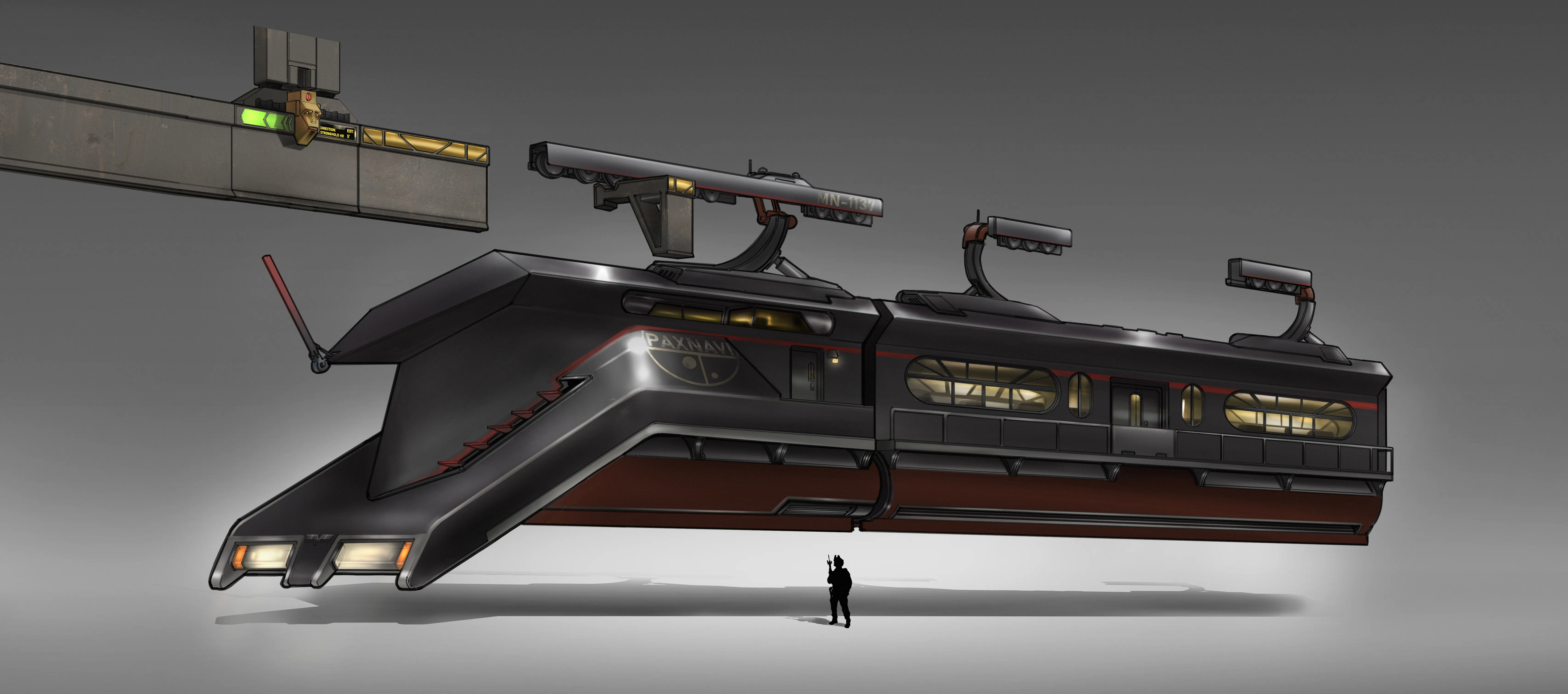
Feature context
- Project context
- Obversus: Umbra
- Status
- Shipping Ready (in backend)
- Engine
- Unreal Engine 5.8
Responsibilities
- Designed and implemented the whole system in C++, from the rail and stations to the carriage placement and the ride feel.
- Built the networking: server authority over the journey, client side prediction of the movement.
- Built the editor tooling designers use to lay out a line and place stations.
Overview
A monorail is a train that hangs from a single rail above it instead of sitting on two rails below it. In the game it is transport: you walk into a carriage, someone pulls the lever, and the train carries everyone to the next station while the level moves past outside.
Everything here is tunable without code: the route, the stations, the carriage count, and every speed, stop, and timing are designer editable content.
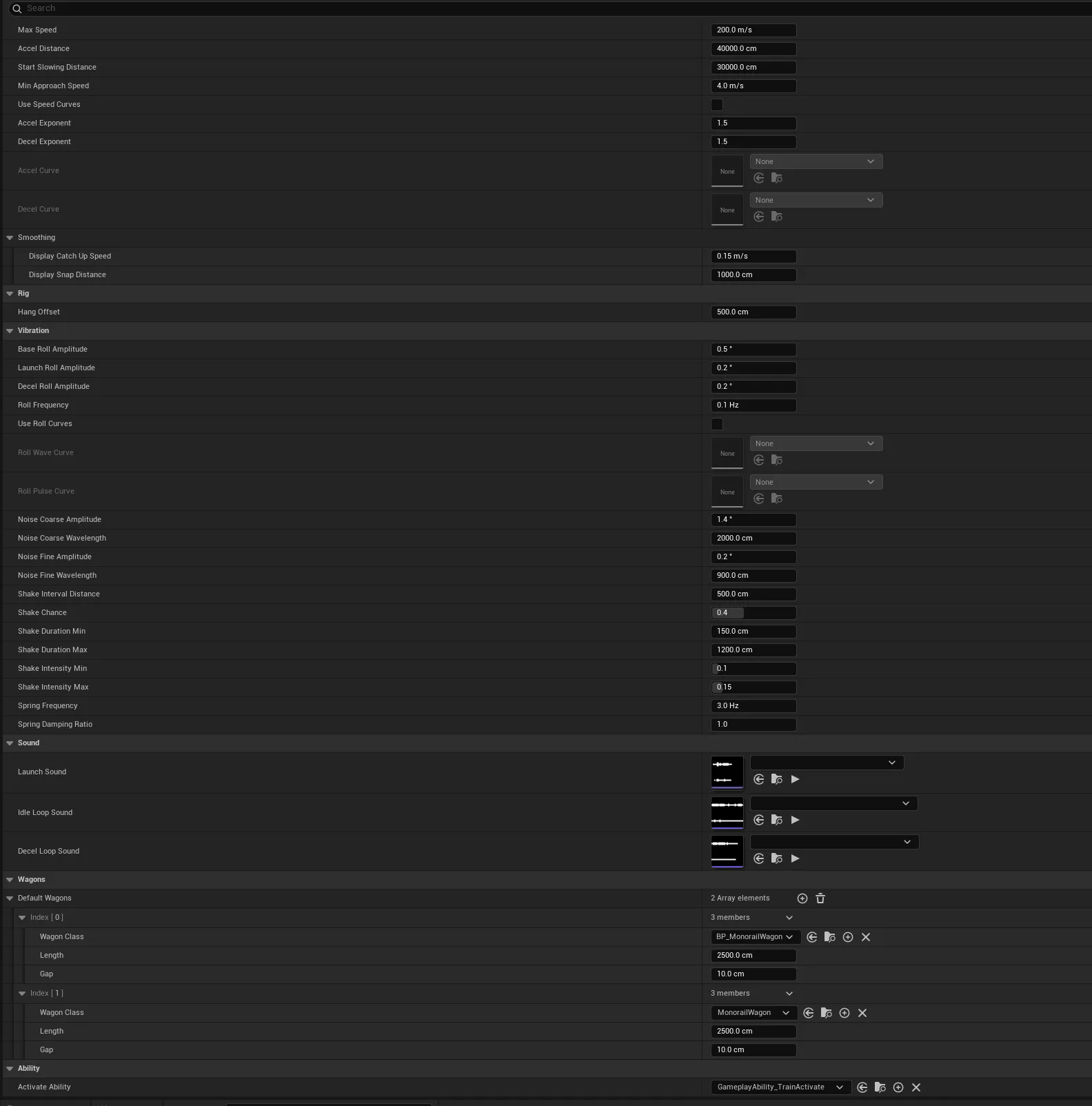
How designer sets up the Monorail
Four steps, all in the editor, no code:
-
Draw the line. Place a track actor and shape its spline through the level. Curves, climbs, dips, whatever the level needs.
-
Drop the stations. Either place them by hand or press a button on the track that drops one at every point of the spline, already wired up. Each station finds the nearest spot on the rail by itself and reports back to the track, which keeps them sorted by distance so “the next stop ahead” is a lookup rather than a search:
void AMonorailTrack::RegisterStation(AMonorailStation* Station, float Distance, const FVector& RailPoint) { // Drop any stale entry first, so a re-register updates in place. Stations.RemoveAll([Station](const FMonorailStationRegistration& Reg) { return Reg.Station == Station; }); // ... Stations.Add(Reg); Stations.Sort([](const FMonorailStationRegistration& A, const FMonorailStationRegistration& B) { return A.Distance < B.Distance; }); } -
Build the train. Choose how many carriages and which mesh each one uses. One carriage or twelve, the system does not care.
-
Tune it. Speed, how hard it accelerates, how early it starts braking, how far it hangs below the rail, how much it sways. Whether a station is a stop the players control with the lever, or a timed stop where the train waits a set number of seconds and then leaves on its own.
Tuning lives in a data asset
None of the numbers in that last step are hardcoded. A train reads a MonorailConfig data asset on begin play, and that asset is the single source of truth for what a train is. It holds:
- Movement: cruise speed, the distance the train takes to reach it, the distance before a stop where braking starts, and a speed floor so the taper actually arrives instead of crawling.
- Smoothing: how fast a client’s predicted position corrects toward the server’s, and the gap at which it stops easing and snaps.
- Shape: acceleration and braking curves. There are exponents for quick tuning, and a toggle that swaps them for authored curve assets. Flipping the toggle greys out whichever set is not in use, so the panel never shows two competing controls at once.
- Rig: how far the body hangs below the rail.
- Ride feel: sway size and frequency, launch and braking roll spikes, two noise layers, how often shakes happen and how long and strong they get, and the stiffness and damping of the spring the body chases its target roll with.
- Sound: the departure one shot, and the looping engine and brake sounds.
- Contents: the default carriage list, which a placed train copies into its own editable array.
Because a config is shared, retuning every train on a level is one asset edit. Because a placed train copies the carriage list rather than referencing it, one train can differ without forking the config.
Hanging is a number, not an assumption. HangOffset is how far the body sits below the rail, so a config with that set to zero and different meshes turns the same system into a ground train running on a spline, no code touched.
Riding it
Standing inside a moving vehicle is the part that quietly breaks in most engines. Unreal already solves it: a character can be based on the surface it stands on, so it inherits that surface’s motion, including while jumping. Turning that on for the carriage floor means players stand, walk around, and jump inside a moving train without sliding out the back, and it costs nothing to maintain because it is the engine’s own system rather than one I would have to keep working on.
The trap is frame ordering. If the rider’s movement runs before the carriage moves, the player spends every frame standing on where the carriage was, which reads as sliding. Each carriage ticks, and the first one to tick each frame drags the whole train’s move forward, so the floor is always on this frame’s position before anyone standing on it moves:
void AMonorailWagon::Tick(float DeltaSeconds)
{
	Super::Tick(DeltaSeconds);

	// First wagon to tick moves the whole train; later calls this frame no-op.
	if (AMonorailTrain* Train = OwningTrain.Get())
	{
		Train->EnsureMovedThisFrame(DeltaSeconds);
	}
}

void AMonorailTrain::EnsureMovedThisFrame(float DeltaSeconds)
{
	if (LastMoveFrame == GFrameCounter)
	{
		return;
	}
	LastMoveFrame = GFrameCounter;

	if (HasAuthority() && bJourneyActive)
	{
		TickJourney(DeltaSeconds);
	}
	UpdateDisplayHead(DeltaSeconds);
	UpdateVibration(DeltaSeconds);
}
How it works
The system splits into four objects, each owning exactly one thing:
| Object | Owns |
|---|---|
| Track | The spline that is the rail, and the sorted list of stations on it |
| Station | One stop: where it is on the rail, and whether the train waits there |
| Train | The brain. Where the front of the train is, how fast it is going, and where it is heading next |
| Carriage | One visible car. No logic of its own, the train places it |
The train has no mesh at all. Every piece of visible geometry is a carriage, and the front carriage is simply the first one in the list. That sounds like a technicality, but it is what makes the length of the train free: adding a carriage is adding an entry to an array, not editing the train.
One number drives everything
The entire position of the train is a single value: how far the nose has travelled along the rail, measured in centimetres of arc length. Everything else is derived from it every frame.
That choice is what keeps the system honest. There is no per carriage physics to drift out of sync, no accumulated error between cars, and no separate state to replicate. Move the one number and the whole train follows.
Moving it is one function, and it is deliberately pure: it reads the journey state and returns the next head distance without changing anything. Speed comes from a distance based trapezoid, ramping up from where the leg started and tapering down into the mark, taking whichever is lower:
float AMonorailTrain::StepHead(float Head, float DeltaTime, float& OutSpeed, ...) const
{
	const int32 Direction = GetDirection();
	// ...
	// Signed distance still to travel toward the mark.
	const float Remaining = Direction * (TargetDistance - Head);
	if (Remaining <= 1.f)
	{
		OutSpeed = 0.f;
		return TargetDistance;
	}

	// Ramp up over AccelDistance, taper down over StartSlowingDistance, take the lower.
	// The floor keeps the taper arriving instead of crawling.
	const float Travelled = Direction * (Head - LegStartHead);
	const float AccelAlpha = FMath::Clamp(Travelled / JourneyAccelDistance, 0.f, 1.f);
	const float DecelAlpha = FMath::Clamp(Remaining / JourneyStartSlowingDistance, 0.f, 1.f);
	const float AccelFrac = SpeedFraction(AccelAlpha, /*bAccel*/ true);
	const float DecelFrac = SpeedFraction(DecelAlpha, /*bAccel*/ false);
	const float Speed = FMath::Max(JourneyMaxSpeed * FMath::Min(AccelFrac, DecelFrac), JourneyMinApproachSpeed);

	OutSpeed = Speed;
	Head += Direction * Speed * DeltaTime;
	if (Direction * (Head - TargetDistance) > 0.f)
	{
		Head = TargetDistance;
	}
	return Head;
}
Because it changes nothing, the same function is safe to call from three places: the server advancing the real head, a client predicting its own, and the sway layer sampling the speed profile with a delta time of zero to ask “how fast would we be going here” without moving anything.
How a carriage decides where to sit
Each carriage samples the rail twice, once at its own nose and once at its own tail, then lies along the straight line between those two points. Because both ends come from the same rail, a long train bends through a curve the way a real one does, with each car at a slightly different angle to its neighbour.
The carriages hang below the rail rather than banking with it. That was a deliberate correction: sampling the rail’s own up direction made a car flip hard for a single frame at steep or twisting spline points, which read as the whole carriage teleporting. A suspended body hangs vertically anyway, so using world up removed the spike and lost nothing.
void AMonorailTrain::RepositionWagons(float Head)
{
	float FrontDistance = Head;

	for (int32 Step = 0; Step < Num; ++Step)
	{
		// Forward travel: the highest index wagon leads. Reversed: the lowest does.
		const int32 Slot = bReverseDirection ? Step : (Num - 1 - Step);

		if (Step > 0)
		{
			// This wagon's nose sits its front gap behind the previous wagon's rear.
			FrontDistance -= Direction * WagonGaps[Slot];
		}

		const float RearDistance = FrontDistance - Direction * WagonLengths[Slot];
		const FVector NosePoint = Track->GetTransformAtDistance(FrontDistance).GetLocation();
		const FVector RearPoint = Track->GetTransformAtDistance(RearDistance).GetLocation();

		// Body axis is the chord nose to rear, both sampled from the same rail.
		const FVector Forward = (NosePoint - RearPoint).GetSafeNormal();
		// World up, not the rail's: a twisting spline swings its up vector hard for one
		// frame, which reads as the whole carriage teleporting. A hung body is vertical anyway.
		const FQuat Rotation = FRotationMatrix::MakeFromXZ(Forward, FVector::UpVector).ToQuat();
		const FVector Center = (NosePoint + RearPoint) * 0.5f;
		// ...
		FrontDistance = RearDistance;
	}
}
Multiplayer
The server owns the journey. It decides when the train departs, which station it is heading to, when it starts braking, and when it waits. Clients never make those decisions.
But the server does not stream the train’s position across the network every frame. Instead the movement formula lives in one function that both sides run, and the small set of inputs that formula needs is replicated: the target it is braking toward, where the current leg started, whether it is stopping. The client runs the identical maths locally with no network wait, then eases its own value toward the authoritative one to mop up drift. If the two ever disagree by more than a set distance, which means a genuine desync such as joining midway through a journey, it snaps rather than sliding visibly across the gap.
void AMonorailTrain::UpdateDisplayHead(float DeltaSeconds)
{
	// Server integrates every frame with the real delta, so it is already smooth. Draw it straight.
	if (HasAuthority())
	{
		DisplayHead = HeadDistance;
		RepositionWagons(DisplayHead);
		return;
	}

	// Client: step the local head with the exact same profile math the server runs.
	PredictedHead = StepHead(PredictedHead, DeltaSeconds, /* ... */);

	// Correct toward the authoritative value. A gap past the snap distance is a real desync
	// (joined mid journey, missed a replication window), so snap instead of sliding across it.
	const float Gap = HeadDistance - PredictedHead;
	if (FMath::Abs(Gap) > Config->DisplaySnapDistance)
	{
		PredictedHead = HeadDistance;
	}
	else
	{
		const float MaxStep = Config->DisplayCatchUpSpeed * DeltaSeconds;
		PredictedHead += FMath::Clamp(Gap, -MaxStep, MaxStep);
	}

	DisplayHead = PredictedHead;
	RepositionWagons(DisplayHead);
}
The result is that a client standing on a platform watching the train arrive sees exactly what the server sees, at full frame rate, without the server paying for constant position updates.
Ride feel
A train that tracks its rail perfectly looks dead. On top of the exact position sits a layer of sway: a gentle cruising wave, a stronger pulse when the train launches or brakes, and occasional shakes.
Two things make that layer safe. It only ever rotates the carriage bodies, so it can never affect where the train actually is or where a player standing inside it ends up. And the shakes are scheduled from the train’s own distance along the rail through a seeded random stream, so every machine independently calculates the same shake at the same point on the line without a single byte crossing the network.
The shake is hard to see in the footage above. It is kept subtle on purpose: the carriage moves a little, and once it has a real model those small movements will give the ride some soul. It is the one part of the config that needs slow, careful tuning passes: too little and the ride feels static, too much and it becomes uncomfortable to stand in.
Idle trains cost nothing
A train sitting at a station with nobody riding it does no work. Once the journey ends and the visible position has caught up with the real one, the train and all of its carriages switch their own ticking off. Starting a journey wakes them again. On a level with several lines this is the difference between idle track furniture being free and being a per frame cost.
Editor tools for the level designer
Four buttons and one behaviour, all aimed at removing manual coordinate work:
- Spawn Stations At All Points drops a station on every point of the rail spline, already wired to the track, skipping any point that has one.
- Spawn Station At Point Index does the same for a single chosen point.

- Load Wagons From Config prefills a placed train’s carriage list from the config, so a designer starts from the default and edits from there instead of building the list by hand.
- Refresh Wagons rebuilds the carriages after the rail spline changes, since the spline lives on the track and does not trigger the train’s own rebuild.
- A spawned station remembers which spline point it came from and keeps following it, so dragging the point drags the station with it. Fine positioning is a separate offset, which means lining a train up with a platform never requires moving the station off the rail.
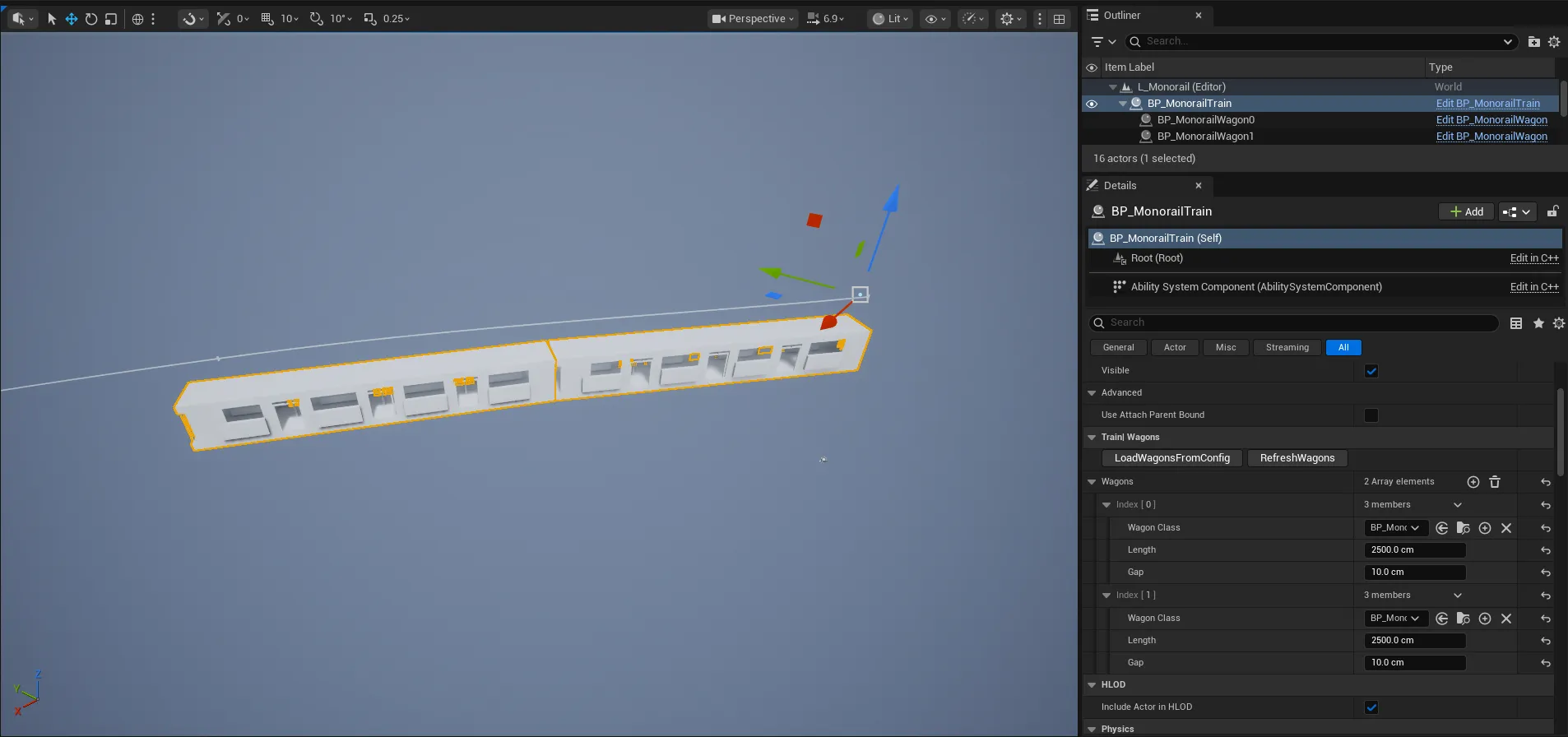
The track, stations, and train all tick in the plain editor viewport, not just in play mode. That is deliberate: the layout feedback appears while a designer is dragging spline points, without entering the game.
Debug console variables
Five gates, following the project’s <Feature>.Debug* naming:
| Variable | Shows |
|---|---|
Monorail.DebugAll |
Master switch, forces all of the below on at once |
Monorail.DebugStations |
Each station’s projected rail point, its registered distance, and its order index |
Monorail.DebugSpline |
The rail path with distance tick marks and the clamped ends of the open line |
Monorail.DebugTrain |
The head and per carriage sample points, hang pivots, tangents, and live distance |
Monorail.DebugNet |
The server’s authoritative distance against the client’s predicted one, and the drift between them |
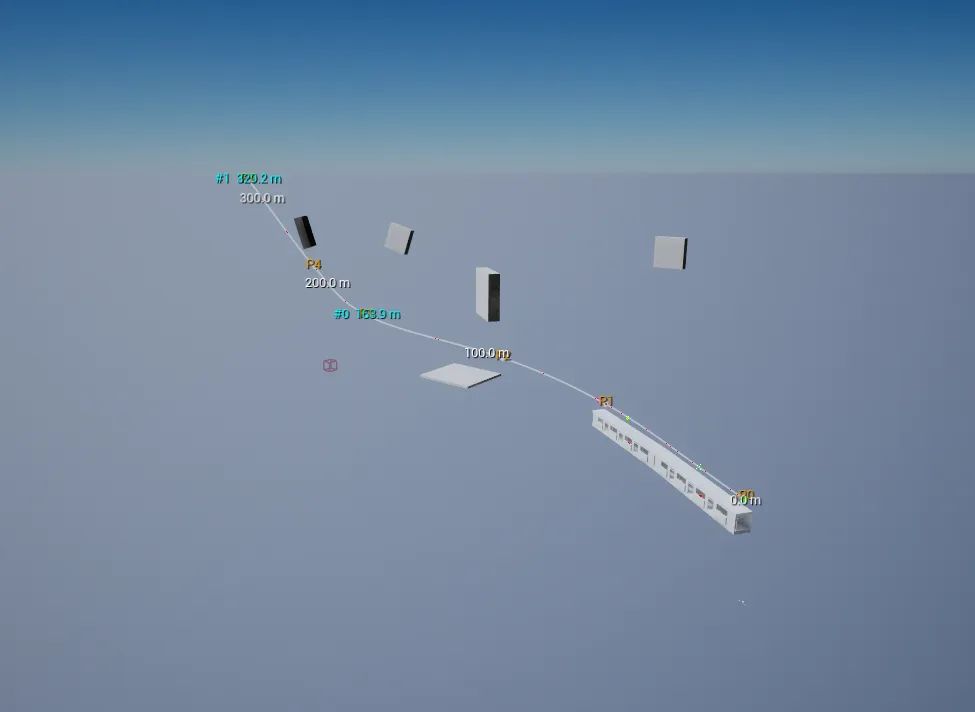
The split matters. Each one answers a specific question: are the stations registered in the right order, is the rail shaped the way I think, are the carriages articulating correctly, and is the client drifting from the server. DebugNet in particular is the one that turns “a rider feels like they are sliding” into a number you can watch.
Drawing world space text needed its own path, because Unreal’s debug string helper cannot draw into the plain editor viewport. That text goes through a canvas overlay instead, so the labels show up in the editor and in play mode alike.